Inspect your robotic mower blades every two weeks during peak growing season—dull or damaged blades tear grass rather than cut it cleanly, leaving brown, frayed tips that invite disease and make your lawn look unkempt. Most manufacturers recommend replacing blades every one to three months depending on lawn size and terrain, but sandy soil, pine cones, and hidden debris accelerate wear significantly.
Remove the blade disc monthly and clear away the compacted grass clippings underneath using a stiff brush and garden hose, as this buildup reduces cutting efficiency by up to 30% and strains your mower’s motor unnecessarily. While the mower is powered off, flip it gently and check each razor blade for chips, bends, or rounded edges—these small blades are inexpensive and designed for quick replacement, not sharpening.
Rotate your blade positions every replacement cycle to ensure even wear across the cutting disc, extending the life of your blade assembly and maintaining consistent cut quality. Keep a spare set of blades on hand so you can swap them immediately when performance drops, allowing you to clean the used set thoroughly without downtime.
The connection between sharp blades and battery life often surprises new robotic mower owners—dull blades force the motor to work harder, draining power faster and reducing the area your mower can cover per charge. This simple maintenance habit protects your investment while delivering the precise, healthy cut that makes robotic mowing worthwhile, and it takes less time than you’d spend pushing a traditional mower across your smallest garden bed.
Understanding Robotic Mower Blades: Small but Mighty
How Robotic Mower Blades Actually Work
Unlike traditional rotary mowers with their hefty, heavy-duty blades, robotic mowers take a completely different approach that’s actually quite clever. Think of them as giving your lawn a gentle haircut rather than a dramatic trim.
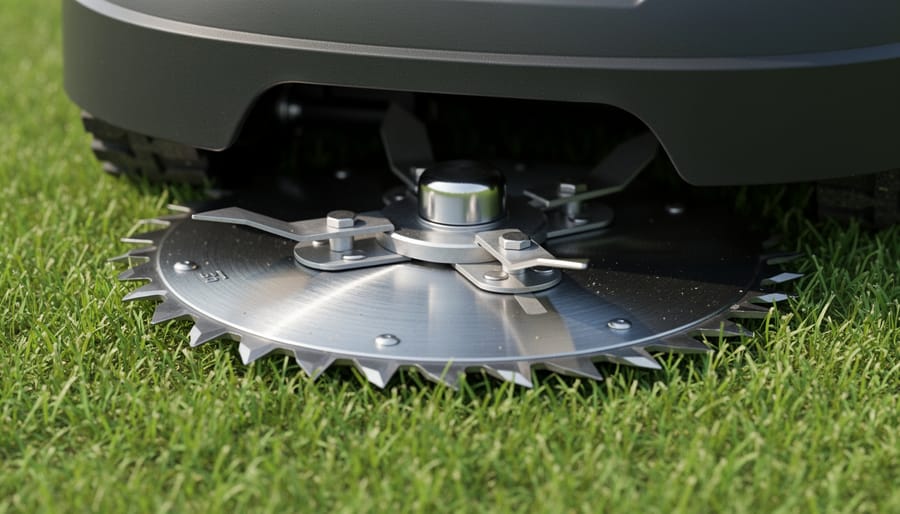
Most robotic mowers use what’s called the “razor blade” system. Instead of one or two large blades spinning beneath the deck, they feature multiple small, pivoting blades attached to a rotating disc. These tiny blades are surprisingly light, often weighing just a few grams each, and they’re designed to work more like razors than traditional mower blades.
Here’s where it gets interesting: because your robotic mower works every day or every other day, it only needs to trim a small amount of grass each time. Those small blades don’t need brute force to power through overgrown lawn areas. Instead, they make frequent, light cuts that keep your grass at a consistent height. This regular trimming approach is actually better for your lawn’s health, as it reduces stress on the grass plants and creates those fine clippings that decompose quickly, naturally fertilizing your soil.
The small blade design also offers practical advantages for you as the owner. They require less energy to spin, which means better battery efficiency and longer mowing sessions. They’re safer too, since their reduced mass and pivoting design means they retract when they hit obstacles like sticks or stones. Plus, when it’s time to replace them, the small blades are inexpensive and easy to swap out at home, making maintenance more sustainable and cost-effective than dealing with large, expensive traditional mower blades.
Signs Your Blades Need Attention
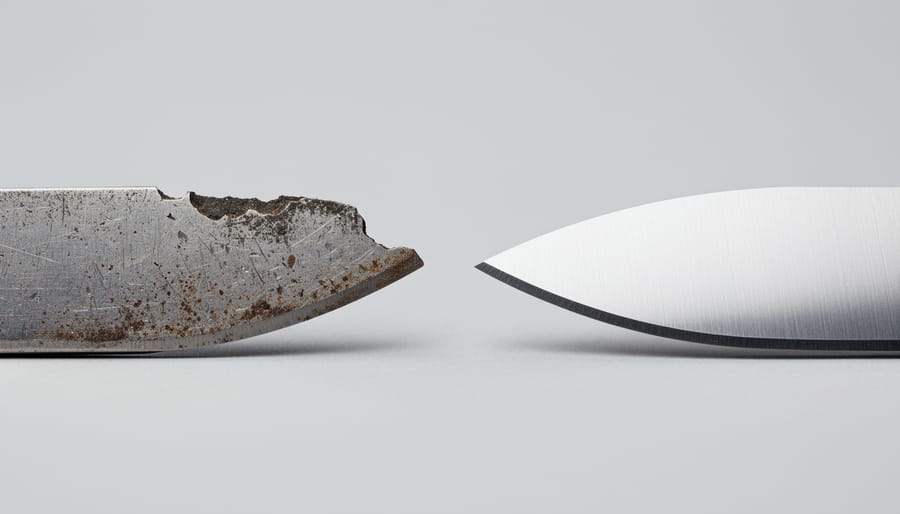
Knowing when your robotic mower blades need attention can save you from frustration and keep your lawn looking its best. Your grass itself often gives you the first clue. Take a close look at the tips of your grass blades after mowing. If they appear torn, brown, or ragged rather than cleanly cut, it’s time to check those blades. This tearing happens because dull blades essentially rip the grass instead of slicing it, and those damaged tips not only look unsightly but also make your lawn more vulnerable to disease.
You might also notice uneven cutting patterns across your lawn, with some areas shorter than others. While this can sometimes indicate other issues, worn or damaged blades are often the culprit, and understanding how sharp blades affect cutting quality helps you diagnose the problem quickly.
Pay attention to your mower’s battery performance too. If your robotic mower seems to drain its battery faster than usual, dull blades could be forcing the motor to work harder. Finally, give the blades themselves a visual inspection every few weeks. Look for chips, cracks, bends, or worn edges. These are clear signs that replacement or sharpening is overdue for optimal lawn health.
The Right Way to Clean Your Robotic Mower Blades
Safety First: Preparing Your Mower for Blade Maintenance
Before you dive into blade maintenance, let’s talk about keeping yourself safe. Think of this as setting up your workspace just like you would before tackling any garden project.
First things first: disconnect the power. Most robotic mowers have a main power switch or require you to remove the battery entirely. Check your owner’s manual if you’re unsure, but never skip this step. Even a small robotic mower can cause injury if the blades accidentally engage.
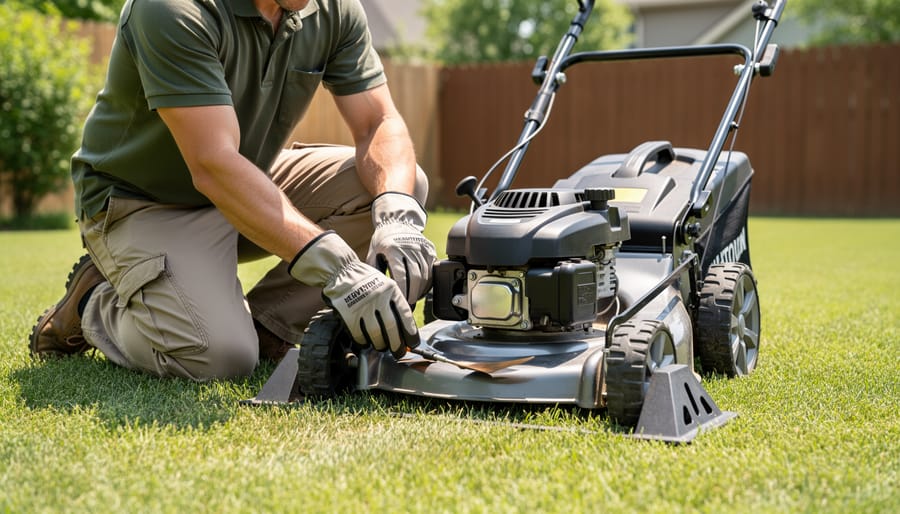
Next, grab a sturdy pair of work gloves. Those blades are surprisingly sharp, even when they look dull or worn. I learned this the hard way during my first blade change, and I’d rather you didn’t make the same mistake.
Position your mower on a stable, flat surface like a workbench or patio table. Flipping it upside down on wobbly ground is asking for trouble. Some gardeners prefer placing an old towel underneath to protect both the mower’s surface and their workspace.
Finally, create a well-lit area with all your tools within reach. You’ll typically need a screwdriver or hex key, replacement blades, and a brush for cleaning. Having everything organized means you won’t be fumbling around mid-task, which keeps the whole process safer and more efficient.
Step-by-Step Blade Cleaning Process
Keeping your robotic mower blades clean doesn’t require fancy products or complicated procedures. I’ve found that a simple routine after every few mowing cycles keeps my blades performing like new, and it only takes about five minutes.
Start by disconnecting the power completely. Most models require flipping the mower upside down, so place it on an old towel or cardboard to protect the top surface. You’ll immediately notice grass clippings and debris stuck to the blade disc and underneath the chassis.
For light buildup, a stiff-bristled brush works wonders. An old toothbrush is perfect for getting into tight spaces around the blade mounting points. Brush away the dried grass in the direction that won’t push debris further into the mechanism. If you encounter stubborn, caked-on grass, here’s where eco-friendly solutions shine.
Mix equal parts white vinegar and water in a spray bottle. This natural cleaner breaks down grass residue without harsh chemicals that could harm your lawn or local ecosystem. Spray the solution on stubborn spots and let it sit for two minutes before brushing again. For really tough buildup, a paste of baking soda and water creates gentle abrasive action without scratching metal components.
Avoid using metal brushes or scrapers directly on the cutting edges, as these can create nicks that reduce cutting efficiency. Instead, wipe the blade edges with a damp cloth after removing the bulk of debris.
Once clean, dry everything thoroughly with a cloth to prevent rust formation. This simple maintenance routine extends blade life significantly and ensures your mower continues delivering that perfect cut.
Cleaning the Blade Disc and Mounting Area
A clean blade disc isn’t just about the blades themselves. Think of it like maintaining a kitchen knife – you wouldn’t just wipe the blade and ignore the handle, right? The entire blade assembly needs attention for optimal performance and longevity.
After removing the blades, take a moment to thoroughly clean the blade disc and mounting area. Grass clippings love to compact into these spaces, creating a cement-like layer that affects blade rotation and puts unnecessary strain on your mower’s motor. Use a stiff brush or old toothbrush to dislodge stubborn debris, working in circular motions around the disc.
While you’re cleaning, inspect the mounting area for signs of corrosion or rust. These aren’t just cosmetic issues – they can weaken the blade assembly and potentially cause safety hazards. If you spot any rust, gently remove it with fine steel wool or a wire brush. For stubborn corrosion, a biodegradable rust remover works wonders and aligns with sustainable maintenance practices.
This simple cleaning step, done during each blade change, prevents buildup that could compromise your mower’s cutting efficiency and extends the life of your entire robotic mower system.
When and How to Replace Robotic Mower Blades
How Often Should You Replace Your Blades?
Most robotic mower blades need replacing every one to three months during the growing season, though your specific timeline depends on several factors. Think of blade replacement as a regular tune-up rather than an emergency repair—it’s much easier to swap them out proactively than to wonder why your lawn’s looking ragged.
Your lawn size plays a significant role in blade wear. A smaller garden might let you stretch replacement to three months, while larger properties working your mower harder could require monthly changes. Grass type matters too—thicker, tougher varieties like Bermuda or Zoysia will dull blades faster than fine fescue. If your lawn has hidden sticks, pinecones, or small rocks, expect more frequent replacements as these obstacles accelerate wear.
Seasonal considerations are equally important. During peak growing season in spring and early summer, you’ll likely need more frequent blade changes. Many experienced robotic mower users keep a seasonal schedule: fresh blades at the start of spring, mid-summer replacements, and perhaps one more change in early fall.
Here’s a practical tip: inspect your blades weekly. Rounded edges, visible nicks, or torn grass tips instead of clean cuts signal it’s replacement time. Keeping spare blades on hand means you’re always ready for a quick swap, ensuring your lawn stays healthy and beautifully maintained.
Choosing Replacement Blades: OEM vs. Aftermarket
When it’s time to replace your robotic mower blades, you’ll face a common dilemma: should you stick with original equipment manufacturer (OEM) blades or explore aftermarket alternatives? Both options have merit, and understanding the differences helps you make an informed, sustainable choice.
OEM blades are designed specifically for your mower model, guaranteeing perfect compatibility and consistent performance. They typically come with manufacturer warranties and meet exact specifications for blade weight, balance, and cutting edge geometry. The reliability factor is significant, but these blades generally cost more per unit.
Aftermarket blades offer budget-friendly alternatives, and many third-party manufacturers produce quality replacements that perform admirably. The key is identifying reliable suppliers. Look for blades made from hardened steel rather than cheap alloys, proper certification marks, and positive reviews from other users. Some aftermarket options actually outlast OEM blades while costing considerably less.
From a sustainability perspective, consider blade longevity over initial price. Blades that can be resharpened multiple times using proper sharpening techniques reduce waste, regardless of their origin. Some manufacturers now offer recyclable blade programs, accepting worn blades for proper metal recycling.
Quality indicators to watch for include uniform thickness, smooth edges without burrs, proper mounting hole alignment, and appropriate weight specifications. If aftermarket blades cause vibration or uneven cutting, they’re likely poorly balanced and should be replaced immediately to prevent motor damage.
Installing New Blades Correctly
Installing new blades on your robotic mower is simpler than you might think, though attention to detail makes all the difference. Start by ensuring your mower is powered off and disconnected from its charging station. Flip the mower over carefully, protecting the top surface with a soft cloth or towel.
Most robotic mower blades attach with a single screw. Remove the old blade and its accompanying screw, noting which side faces down. Clean the blade mounting area thoroughly before proceeding. When installing the new blade, ensure the cutting edge faces the grass and the blade swings freely on its pivot point. This movement is a safety feature that protects the blade from rocks and hard objects.
Here’s where many folks stumble: overtightening. Your manufacturer’s manual will specify the proper torque, typically between 2 to 4 Newton meters. Without a torque wrench, hand-tighten the screw firmly but don’t force it. Remember, blade balance matters significantly for smooth operation and motor longevity.
Common mistakes include installing blades upside down, mixing different blade types on the same mower, or reusing worn screws. Always replace screws when changing blades, as they’re designed to shear off if the blade hits something solid, protecting your mower’s motor. This sustainable approach prevents costly repairs while keeping your lawn beautifully maintained.
How Blade Maintenance Connects to Battery and Dock Care
Dull Blades Drain Your Battery Faster
You might not realize it, but those dull blades on your robotic mower are quietly draining your battery with every pass across the lawn. When blades lose their sharp edge, your mower has to work significantly harder to cut through grass, drawing more power from the battery to compensate. Instead of slicing cleanly through grass blades, worn edges tear and pull, creating resistance that forces the motor to consume extra energy.
This increased power demand creates a domino effect on your mower’s battery health. First, you’ll notice your mower returning to its charging dock more frequently, unable to complete its usual mowing pattern on a single charge. These more frequent charging cycles gradually reduce your battery’s overall lifespan, as lithium-ion batteries have a finite number of charge cycles before their capacity diminishes. Over time, what started as a simple blade maintenance issue becomes an expensive battery replacement problem.
The environmental impact matters too. A battery-draining mower means more electricity consumption and, eventually, more electronic waste when the battery needs replacing prematurely. By keeping your blades sharp, you’re not just maintaining cutting performance; you’re practicing sustainable battery maintenance that saves money and reduces your environmental footprint. Most robotic mower owners find that regular blade replacement every one to three months keeps their battery running efficiently season after season.
Debris Transfer: From Blades to Dock
Here’s something many robotic mower owners don’t realize until they encounter charging problems: those grass clippings stuck to your blades don’t just stay there. Every time your mower returns home, it carries that debris directly to the charging dock, creating a domino effect that impacts the entire system.
Think of it like tracking mud through your house. As the mower settles onto its charging contacts, grass particles, moisture, and dirt transfer from the blade area to the metal charging plates on both the mower and the dock. Over time, this buildup creates an insulating barrier between the contacts, preventing proper electrical connection. You might notice your mower sitting in the dock but not actually charging, or charging intermittently.
This connection between blade maintenance and charging efficiency highlights why a holistic approach to mower care matters. When you clean your blades regularly, you’re not just ensuring a better cut—you’re protecting your entire charging system and extending the life of critical components.
The good news? This issue is completely preventable with a simple routine. After cleaning your blades, take an extra thirty seconds to wipe down the charging contacts on both your mower and dock with a dry cloth. This small habit prevents costly charging problems and keeps your mower running reliably throughout the season, supporting the kind of low-maintenance, sustainable lawn care we all appreciate.
Creating a Holistic Maintenance Routine
A successful robotic mower relies on more than just sharp blades. Creating a comprehensive preventive maintenance routine ensures your entire system works harmoniously. Start with weekly blade inspections, checking for damage or grass buildup. Every month, clean the charging contacts on both your mower and docking station using a dry cloth to maintain optimal battery performance. During peak growing season, inspect blades every two weeks and replace them when cutting quality declines. Clean the mower’s undercarriage monthly to prevent grass clippings from interfering with blade rotation. Before winter storage, replace worn blades, fully charge the battery, and clean the dock thoroughly. This holistic approach prevents small issues from becoming costly repairs while keeping your lawn consistently beautiful and your equipment running efficiently for years to come.
Pro Tips for Extending Blade Life
Seasonal Blade Strategy
Your robotic mower’s blade maintenance needs shift throughout the year, just like your lawn’s needs change with the seasons. During peak growing season in spring and early summer, grass grows vigorously and your blades work overtime. This is when you’ll want to check them weekly for wear and debris buildup. I’ve found that a quick visual inspection every Sunday morning becomes second nature, and it saves you from discovering dull blades mid-season when your lawn needs them most.
As growth slows in late summer and fall, you can ease up slightly, checking every two weeks instead. However, don’t let cooler weather fool you into complacency. Autumn leaves and moisture can actually accelerate blade dulling and corrosion, so clean them thoroughly during this period.
Winter offers the perfect opportunity for a complete blade system overhaul in most climates. Replace worn blades, clean the cutting deck meticulously, and apply a light coating of protective oil to prevent rust during storage. This proactive approach means you’ll start spring with sharp, efficient blades ready to tackle fresh growth.
In regions with year-round mowing, adjust your maintenance frequency based on rainfall and growth spurts rather than calendar months, keeping sustainability at the forefront by maximizing blade longevity through consistent care.
Environmental Benefits of Proper Blade Maintenance
Keeping your robotic mower blades in tip-top shape isn’t just about achieving that picture-perfect lawn—it’s a genuine win for the environment too. When your blades are sharp and properly maintained, your mower uses significantly less energy to cut through grass. Dull blades force the motor to work harder, draining the battery faster and increasing your electricity consumption over time. Think of it like using a dull kitchen knife; you need more effort and pressure to get the job done.
There’s also the waste factor to consider. By rotating and sharpening your blades regularly rather than replacing them prematurely, you’re keeping metal out of landfills and reducing the demand for manufacturing new blades. Many gardeners don’t realize that well-maintained blades can last several seasons with proper care.
Perhaps most importantly, sharp blades create cleaner cuts that help your grass stay healthier and more resilient. Healthy lawns naturally resist disease and drought better, meaning you’ll need fewer chemical treatments, less supplemental watering, and reduced fertilizer applications. It’s a beautiful cycle: better blade maintenance leads to a thriving lawn that requires fewer inputs, conserving resources while giving you better results. That’s sustainable gardening at its finest.
Your robotic mower’s blades are the unsung heroes of your lawn care routine, working tirelessly beneath the deck to deliver that perfectly manicured look you love. As we’ve explored throughout this guide, keeping those blades in top condition isn’t just about maintaining cutting performance—it’s about protecting your investment, supporting sustainable lawn care practices, and ensuring your mower operates efficiently for years to come.
The beauty of blade maintenance lies in its simplicity. A quick visual inspection every week or two takes just minutes, yet it can prevent costly repairs and keep your lawn looking its best. When you catch blade wear early, you’re not just avoiding scalped patches or straggly grass—you’re also reducing strain on your mower’s motor and battery, which means less energy consumption and a longer-lasting machine.
Think of blade care as the foundation of your robotic mower’s health. Just like you wouldn’t skip oil changes for your car, regular blade attention should become second nature in your lawn care routine. The good news? You don’t need to be a technical expert or spend hours on maintenance. Simple steps like cleaning debris after mowing in wet conditions, checking for damage, and replacing blades when they’re dull will transform your results.
So here’s your challenge: head outside today and take a close look at those blades. Give them a gentle clean, check for any chips or bending, and make note of their condition. That small investment of time now will reward you with a healthier, more beautiful lawn and a mower that performs reliably season after season. You’ve got this!